Determines how a drawing is opened.
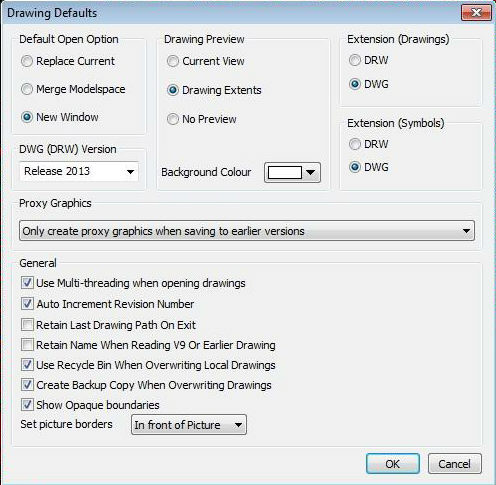
Replace Current will close any open drawings (asking if you require to save them)
|
Caddie does NOT save any changes when replacing the current drawing using this method. You must, therefore, ensure that you save any desired changes BEFORE using this method to open a drawing. |
Merges the Model space will merge any drawing opened with the current drawing
Opens the drawing in a new window (Default).
Determines how the preview is generated when saving drawings or symbols
Saves the current view as the bitmap image
Produces a bitmap of the extents of the drawing. This is the best one to use when saving symbols as the whole symbol will be seen in the preview window.
Doesn't save a preview with the drawing or symbol.
You can also choose the background colour of the bitmap. This is useful particularly if you use a lot of light coloured pens (pen two, yellow, for instance) in your drawing which don't show up too well in the preview if the background is the default white. You can not set existing previews to a background colour without first opening them a re-saving them with the colour option set..
This is where you set the default extension for the saved drawings or symbols. The default extension used for saving drawings and symbols will be the ones specified here. As drawings created with Caddie are in the native DWG format it is recommended that the extension should also be DWG. This allows direct transfer of drawings to other users of the DWG format without converting any names. It also indicates to pre-Caddie10 users that any drawings created in the current version of Caddie can only be imported into pre-Caddie 10 programmes by using the Caddie 9, or earlier, DWG converter (see DWG Version below).
This is where you set the DWG version to be used when saving drawings or symbols. In most cases use the latest version (which is now capable of release 2006 (use 2004 / 2005)). If you are intending to import the DWG drawing into a programme such as Caddie 9 or earlier you will need the ensure that the saved version is compatible with the programme you are using.
Here there are a number of tick boxes that can be set.
When saving a drawing Caddie will increment the revision number if this box is set.
This remembers where you save the last drawing and future a SaveAs will go to the same folder.
Uses the same name for saving the Caddie 9 (or earlier drawing) overwriting the existing one.
If set allows recovery of an accidentally overwritten drawing.
This saves a copy of any opened drawing with the same name and folder as the original but the extension is changed to *.DR!. This file can be opened like any other drawing but you will have to set the file of type to all files (*.*) )to be able to see it in the open dialogue window. If you do open it don't forget to save it as a dwg or drw. This is not the same as doing a Back Up which saves date time stamped drawings in the Backup folder.
Caddie Help Welcome
See Also
Automatic backup facility
Force Backup