 Rotate
Rotate
RotateRotate
Rotate a pattern/element or group of patterns/elements which have been marked for manipulation.
Select on the dialogue box to Keep, Discard, Repeat or Skip the marked pattern(s)/element(s).
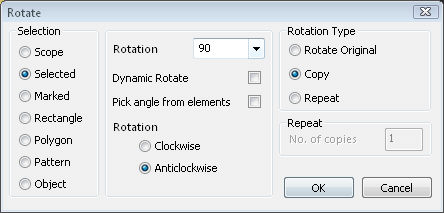
Keep will retain the original selected entities.
Discard option will delete the original selected entities.
Repeat option will retain the original selected entities and repeat the entities a specified number of times.
Skip will cause Caddie to stay in a loop allowing you to indicate various points for placement, each time deleting the previous placement of the entities until a point is finalised by the Option-End command.
Mark the pattern(s) or element(s) to scale using the MARK sub-menu commands if the Auto Clear switch is on. (Patterns/elements can be marked at any time when the Auto Clear switch is off.) After pattern(s) or element(s) have been identified for manipulation, enter the point about which to rotate and the rotation angle. A negative rotation angle is clockwise and a positive rotation angle is anti-clockwise.
You can use the & commands (&scale, &rotate and &mirror) at any time during this command.
All transformation and manipulation commands.
All the mark and unmark commands.
Standard Selection