 DIMS
SetDatm DIMS
SetDatm
DIMS
SetDatm DIMS
SetDatmSets and insert datum level sets on the drawing.
On selecting this command the following dialogue is presented.
>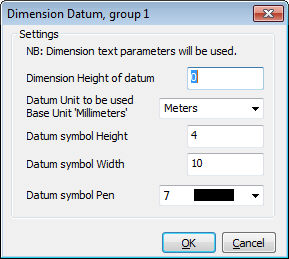
This sets the origin height of the first datum point. All other points are measure from this value.
Caddie will calculate the displayed value based on the current model units and the designated units.
This is the height of the datum symbol
This is the width of the Datum Symbol
The pen the datum symbol is drawn in
For the Datum values, the actual values used are based on the current dimension settings and are set using DimSet.
The display values take into account the scales that may be set.
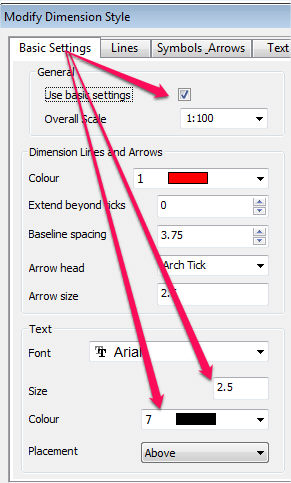
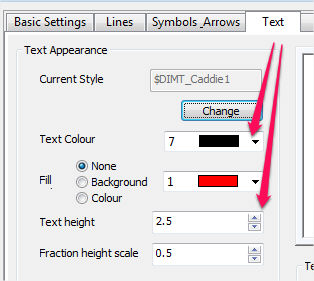
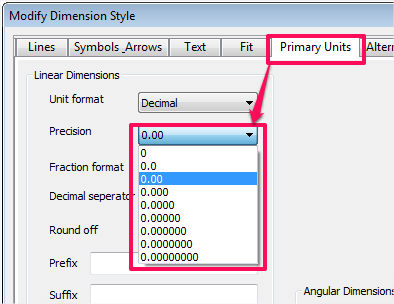
After insertion, text display will be the parameters of the dimension text. The datum value can have a precision value set by the current dimension values.
Select the SetDatm button and indicate a position on the section for the
datum level placement. Enter the datum height (in the required units)
in the dialogue box (see above). The current dimension text parameters
will be used to input the datum height. The construction point on the
level symbol contains the datum intelligence. Do not delete this point.
EXTENTS & BOUNDS:
Use the InsHght button
to insert extra levels and EdtDatm
to change the datum value and re-calculate the levels automatically.