 LaySet
LaySet
LaySetThis is the dialogue that sets all the layer parameters.
This is accessed in a number of places
CADDIE-->SCOPE-->LAYSET
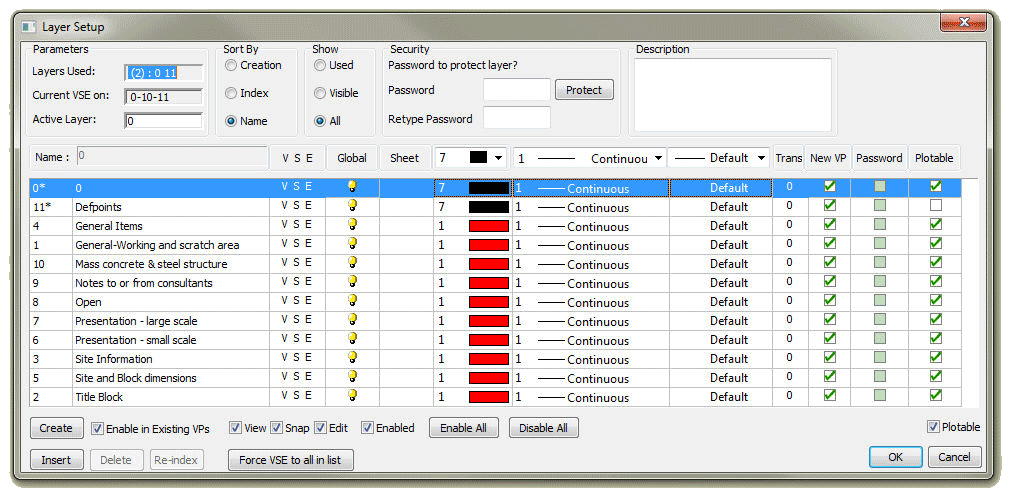
Layers Used
You can enter all the layer settings on the Layer Setup dialogue box.
Layers used will display the number of layers used on the drawing, and the range of layers.
The displayed layers will be listed and you can change it on the dialogue box. You can still use the SCOPE|LayDisp button.
The current layer will be displayed and you can change it. You can also use the SCOPE|LayAct button.
The All, Display or Used option will list all the layers, only the displayed layers or the used layers.
You must select a layer before you can change any of the parameter settings.
Enter or change the layer name in the box below the layer list.
Select the status of the layer: View, Snap or Edit.
If you can Edit a layer, you will be able to Snap and View it.
If you only want to Snap to a layer, you will be able to View it.
If you unselect View as well, the layer will not be visible. The layers listed for SCOPE|LayDisp will not influence your view status of the layer.
If a layer is switched off with the SCOPE|LaySet button and you have included it in the list of layers for display, the system will warn you that you have switched the view of that layer off.
You can assign a pen to a layer. The layer will only be displayed in this pen when the DISPL|LaySCol button is selected.
You can select different pens to show the View, Snap and Edit layers. If you select pen 0, the drawing pen colour will be used. The pen colour settings will only be visible if the scope status is set to Layers.
Layer Password are only valid when drawings are used in a Caddie environment. Any other environment will not see the passwords and therefore layers can be edited.