Measure circumference
Calculate circumference measurement.
Caddie will display the different methods of measure on the dialogue box. They are: Endpoints, Inside and Manual.
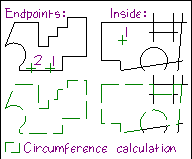
Use Endpoint to measure the circumference of a closed shape constructed with endpoints.
Inside can be used to calculate the circumference of a shape formed by intersections and endpoints.
The Manual option is used to calculate the circumference, element by element.
Caddie will prompt you the indicate the element to start the circumference trace. Indicate, clock-wise, the direction to trace. Caddie will trace the elements from endpoint to endpoint and display the circumference calculation in the keyboard buffer.
Indicate the area to trace inside. Caddie will trace the inside area of the shape and display the calculated circumference in the keyboard buffer. The area for the calculation must be enclosed, but can be formed by a combination of intersections and endpoints.
The Manual option will prompt you to indicate the element (line, arc or circle) to be added. The circumference of the first indicate element will be displayed in the keyboard buffer. The circumference of further indicated elements will be ADDED to the circumference calculation displayed in the buffer.
When selecting the elements, Caddie will change the entities to appear in white. This will disappear when the screen is refreshed. The scale and units settings will influence the circumference calculations.