 DIMS AutoDim DIMS AutoDim
COMMAND:
Automatic dimensioning
AIM:
Automatic dimensioning of lines or between points
EXECUTION:
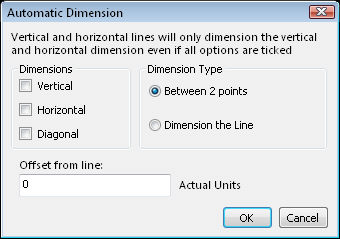
The AutoDim button will dimension indicated lines or between 2 indicated points. Select the automatic dimensioning options on the dialogue box.
The dimensioning can be horizontal, vertical and/or diagonal. The dimension type can be a line or 2 points. Enter the dimension line offset in actual units.
Dimension the line:
If you select the line dimension option, indicate the line to dimension and the direction for the placement of the dimension.
Between 2 points:
If you select the between 2 points option, indicate the 2 points and the direction for the placement of the dimension.
If an indicated line (or 2 points) is horizontal or vertical, only a horizontal or vertical dimension will be calculated even if the other options are selected.
EXTENTS & BOUNDS:
The scale and unit setting will have an influence on this button.